AI Coding Assistants Went From Autocomplete to Co-Pilot
Two years ago, AI coding tools suggested the next line. Now they plan across dozens of files, run tests, fix their own mistakes, and ship working features autonomously.
The landscape is crowded — and choosing the right tool genuinely affects how fast you ship. According to GitHub's 2025 developer survey, over 92% of developers now use AI coding tools in some form. But adoption doesn't equal mastery — most developers are still using these tools well below their potential.
This comparison breaks down the five tools that matter, what each does well, where each falls short, and how to squeeze the most out of whichever one you pick. If you're new to AI-assisted development, start with our guide to what vibe coding is for the foundational concepts.
Quick Comparison
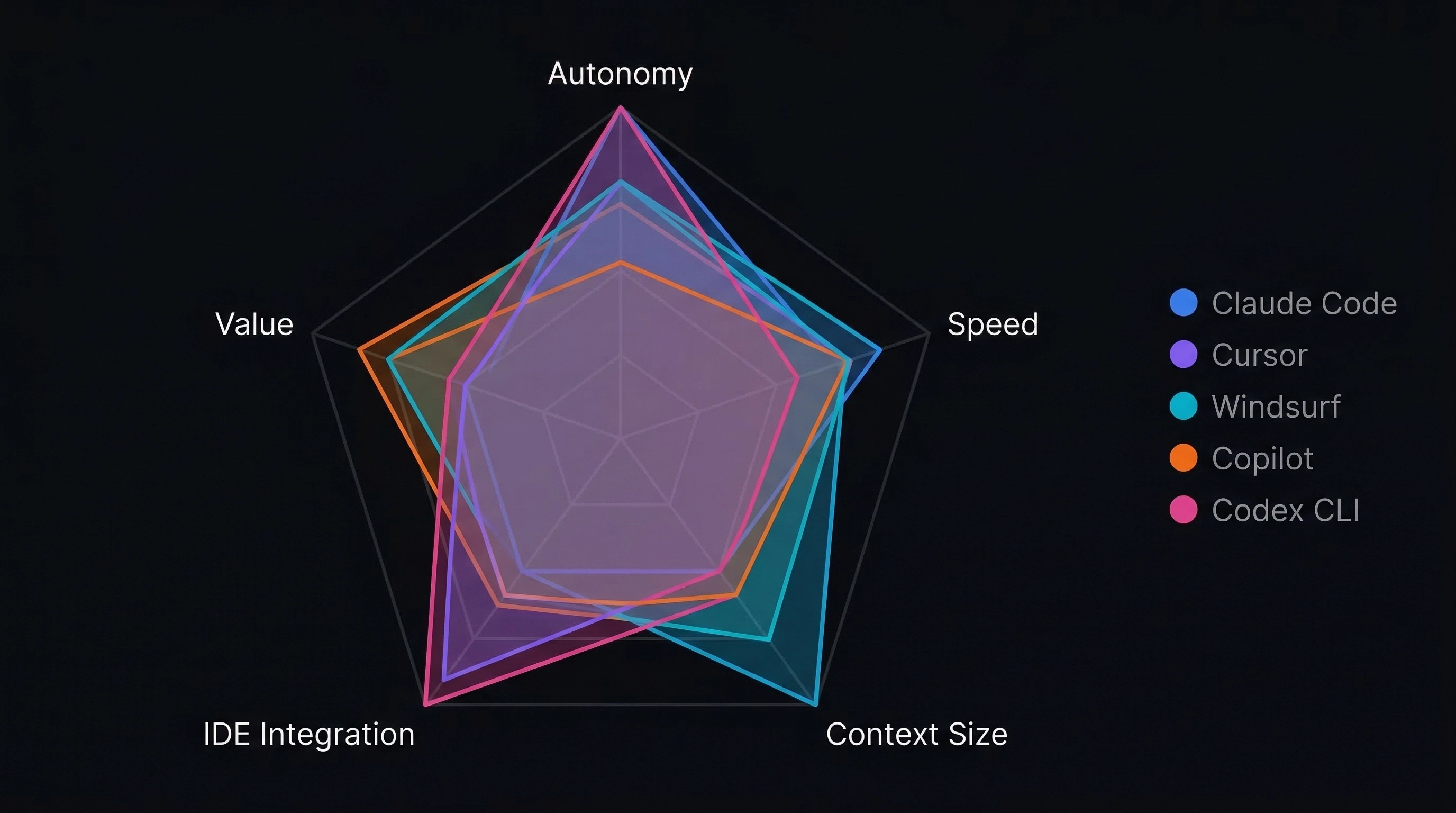
| Tool | Style | Price | Best For |
|---|---|---|---|
| Claude Code | Terminal agent | Usage-based | Deep reasoning, multi-file refactors |
| Cursor | VS Code fork | $20/mo Pro | Visual editing, inline completions |
| Windsurf | Agentic IDE | Generous free tier | Budget-friendly, autonomous flows |
| GitHub Copilot | IDE extension | $10/mo Pro | GitHub ecosystem, quick edits |
| OpenAI Codex CLI | Terminal agent | API costs only | Open source, sandboxed execution |
🤖 Claude Code (Anthropic)
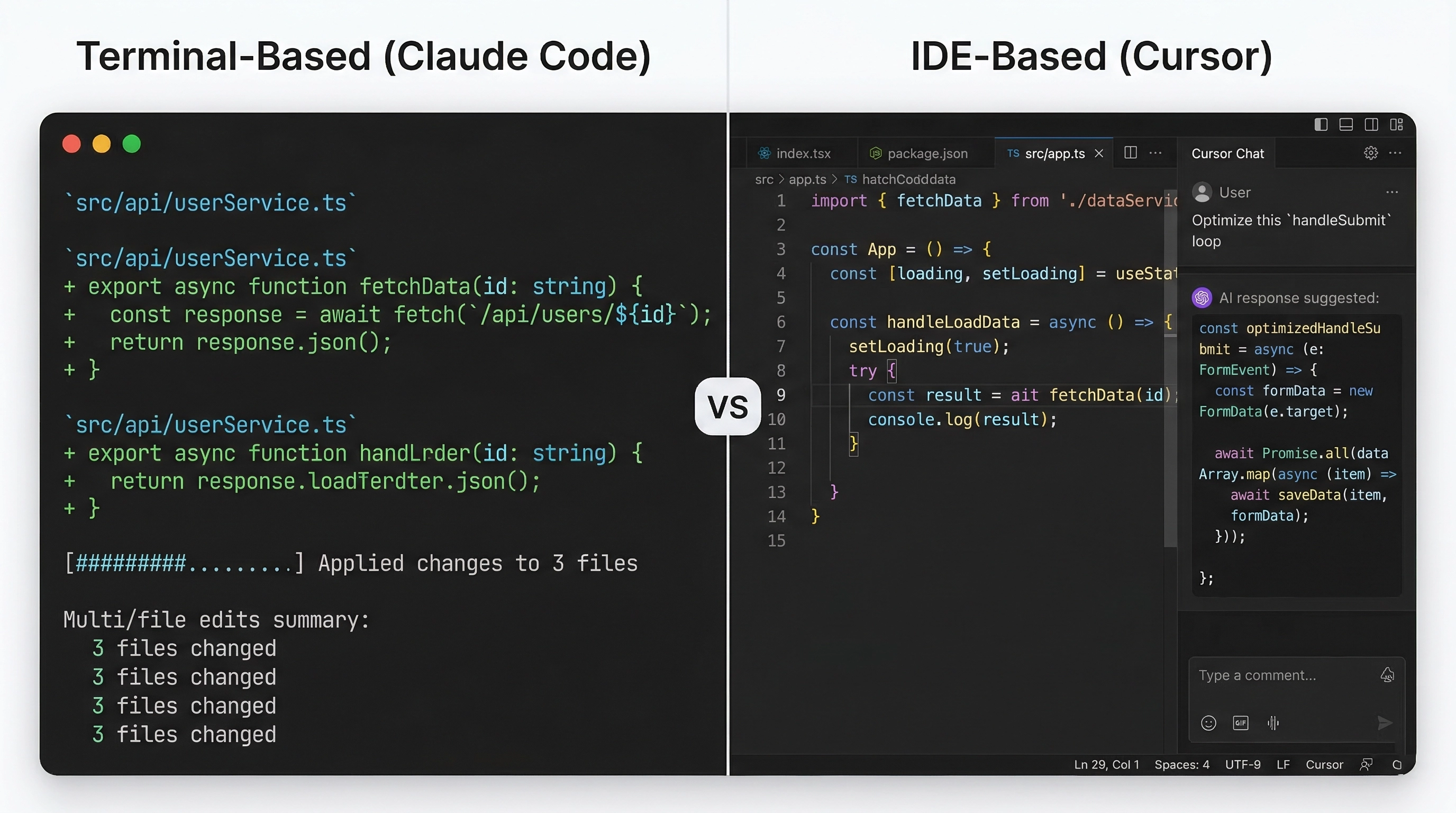
Terminal-native AI agent from Anthropic. Runs in your shell, reads your entire codebase, executes commands, edits files, and manages git — no IDE plugin needed.
Strengths: Multi-file refactoring, architectural reasoning, and complex debugging sessions. The agentic approach means it plans across dozens of files, runs tests to verify changes, and iterates until things work. Context window handles large codebases without chunking issues. Particularly strong with structured documents like PRDs and task lists — turns them into working code with minimal hand-holding.
Limitations: Terminal-only means no inline IDE suggestions. Steeper learning curve if you're used to tab-completion workflows. Usage-based pricing can add up on large projects.
Best for: Full-stack developers who need deep codebase understanding and prefer an autonomous agent over line-by-line suggestions.
In our experience building VibeGen, Claude Code became our primary tool for any change touching more than three files. We use it with a CLAUDE.md project file that defines our conventions — Next.js App Router patterns, Supabase RLS policies, Stripe webhook handling. That context file alone improved output quality significantly because the AI stops guessing at your architecture and follows your established patterns.
✏️ Cursor
A fork of VS Code rebuilt around AI-first workflows. Inline completions, chat sidebar, and a Composer mode that edits multiple files from a single prompt. Built by Anysphere.
Strengths: The inline experience is polished. Tab completions feel natural, and Composer handles multi-file edits within the IDE. The "rules" system lets you define project-specific instructions that persist across sessions. Familiar to anyone coming from VS Code.
Limitations: Context handling can be inconsistent on larger codebases. The $20/month Pro plan gates access to the best models. Heavy usage can hit rate limits that interrupt flow.
Best for: Developers who want AI tightly integrated into their editor and prefer visual, inline suggestions.
Cursor shines for UI work. When building VibeGen's pricing page and dashboard components with Tailwind CSS and shadcn/ui, the inline completions were noticeably faster than writing from scratch. The visual feedback loop — see the change, accept or reject, iterate — feels natural for frontend work.
🌊 Windsurf
Built by Codeium, Windsurf positions itself as an AI-native IDE with Cascade — an agentic flow that chains chat, inline edits, and command execution in a single interaction.
Strengths: Cascade flows combine reasoning, file edits, and terminal commands seamlessly. Generous free tier compared to competitors. Handles web search and documentation lookup natively — useful for unfamiliar libraries.
Limitations: Agent capabilities are less mature than Claude Code's for complex multi-step tasks. Performance can lag on larger projects. The editor trails Cursor in polish.
Best for: Developers who want agentic features in a visual IDE, especially those watching their budget.
🐙 GitHub Copilot
The most widely adopted AI coding assistant, built by GitHub and OpenAI. Now in its agent mode era — integrates directly into VS Code, JetBrains, and Neovim with access to multiple models including Claude and GPT.
Strengths: Ubiquity. Works in editors developers already use. GitHub integration means PR summaries, code review assistance, and issue-to-code workflows are built in. Cheapest paid option at $10/month.
Limitations: Agent mode is functional but less capable than dedicated tools for complex tasks. Model routing can feel opaque — you don't always know which model handles your request. Context understanding is shallower than tools built around large context windows.
Best for: Teams already in the GitHub ecosystem who want solid completions without switching editors.
🔓 OpenAI Codex CLI
OpenAI's answer to Claude Code — an open-source, terminal-based agent that reads your codebase and executes changes autonomously. Runs locally with sandboxed execution for safety.
Strengths: Open source means full transparency and extensibility. Sandbox modes (suggest, auto-edit, full-auto) give granular control over autonomy. Free to run with an OpenAI API key — no separate subscription.
Limitations: Younger than the competition. Tooling and documentation still catching up. Performance depends heavily on which model you route to.
Best for: Developers who value open source, want terminal-based agents, and are already in the OpenAI ecosystem.
🔧 How to Get the Most Out of Any Tool
Regardless of which assistant you choose, these practices consistently produce better results. We've learned these through months of daily use across multiple tools while building VibeGen.
Write Project Context Files
Every major tool supports some form of persistent project instructions:
- Claude Code:
CLAUDE.mdat the project root - Cursor:
.cursorrulesfile - GitHub Copilot:
.github/copilot-instructions.md
These files tell the AI about your tech stack, coding conventions, file structure, and patterns to follow. Without them, the AI makes reasonable but generic decisions. With them, it follows your patterns.
Structure Your Prompts Like Specs
Instead of "add user authentication," try:
"Add email/password authentication using Supabase Auth. Create a /login page with email and password fields using shadcn/ui Input and Button components. On successful login, redirect to /dashboard. Store the session in Supabase's built-in session management. Add a protected route wrapper that redirects unauthenticated users to /login."
The extra 30 seconds of prompt writing saves 15 minutes of correcting bad output.
Use PRDs for Anything Non-Trivial
For features that span multiple files or require architectural decisions, write a mini-PRD first. This is where tools like VibeGen pay for themselves — generating structured PRDs that AI coding assistants can consume directly. Learn more about this workflow in our guide to going from idea to PRD in 10 minutes.
Commit Between Tasks
Feed the AI one task at a time. After each working change, commit. This gives you clean rollback points and prevents the AI from tangling unrelated changes together.
🎯 The Thing Most Comparisons Miss
Here's what really determines your results: the quality of your input.
Every tool on this list performs dramatically better when given structured context. Try giving Claude Code or Cursor a vague prompt like "build me a dashboard" versus a PRD that specifies:
- Data sources and component hierarchy
- State management approach
- Edge cases and error handling
- Acceptance criteria
The difference in output quality isn't subtle. It's the difference between "sort of works" and "actually ships."
This pattern holds across all five tools. Structured input leads to structured output. Every time.
💰 Pricing Deep Dive
Cost matters, especially for indie hackers and solo founders. Here's a more detailed breakdown:
| Tool | Free Tier | Paid Plan | Usage Model |
|---|---|---|---|
| Claude Code | Limited via claude.ai | Max plan or API | Per-token via API |
| Cursor | 2 weeks trial | $20/mo Pro, $40/mo Business | Flat + overage |
| Windsurf | Generous free tier | $15/mo Pro | Flat rate |
| GitHub Copilot | Free for students/OSS | $10/mo Individual | Flat rate |
| Codex CLI | Unlimited (bring API key) | N/A | Pay per API token |
For solo developers building a side project, GitHub Copilot at $10/month or Windsurf's free tier offers the best entry point. For serious indie hackers shipping production SaaS, the combination of Claude Code for complex work and Cursor for UI polish is worth the investment.
If you're evaluating your full stack costs, our indie hacker tech stack guide covers pricing across the entire toolchain — not just AI assistants.
🔄 Combining Tools: The Multi-Tool Workflow
Many developers combine tools — and this is often the optimal approach. Here's the workflow we've settled on for VibeGen development:
- Planning: VibeGen for PRD and task generation
- Complex features: Claude Code for multi-file changes, refactors, migrations
- UI work: Cursor for component building, styling, inline edits
- Quick fixes: GitHub Copilot for one-off completions and small edits
The tools aren't mutually exclusive. Each has a sweet spot, and matching the tool to the task produces better results than forcing one tool to do everything.
Where VibeGen Fits In
VibeGen generates PRDs specifically designed to work well with AI coding assistants. The PRDs include implementation task lists, technical architecture decisions, and the structured detail these tools need to produce good code.
If you're using any of these AI assistants to build your project, starting with a solid PRD saves hours of back-and-forth prompt iteration. You can start free and generate a PRD for your next idea to see the difference structured input makes.
For inspiration on what to build, browse our list of the best AI idea generators for vibe coders.
Which Should You Choose?
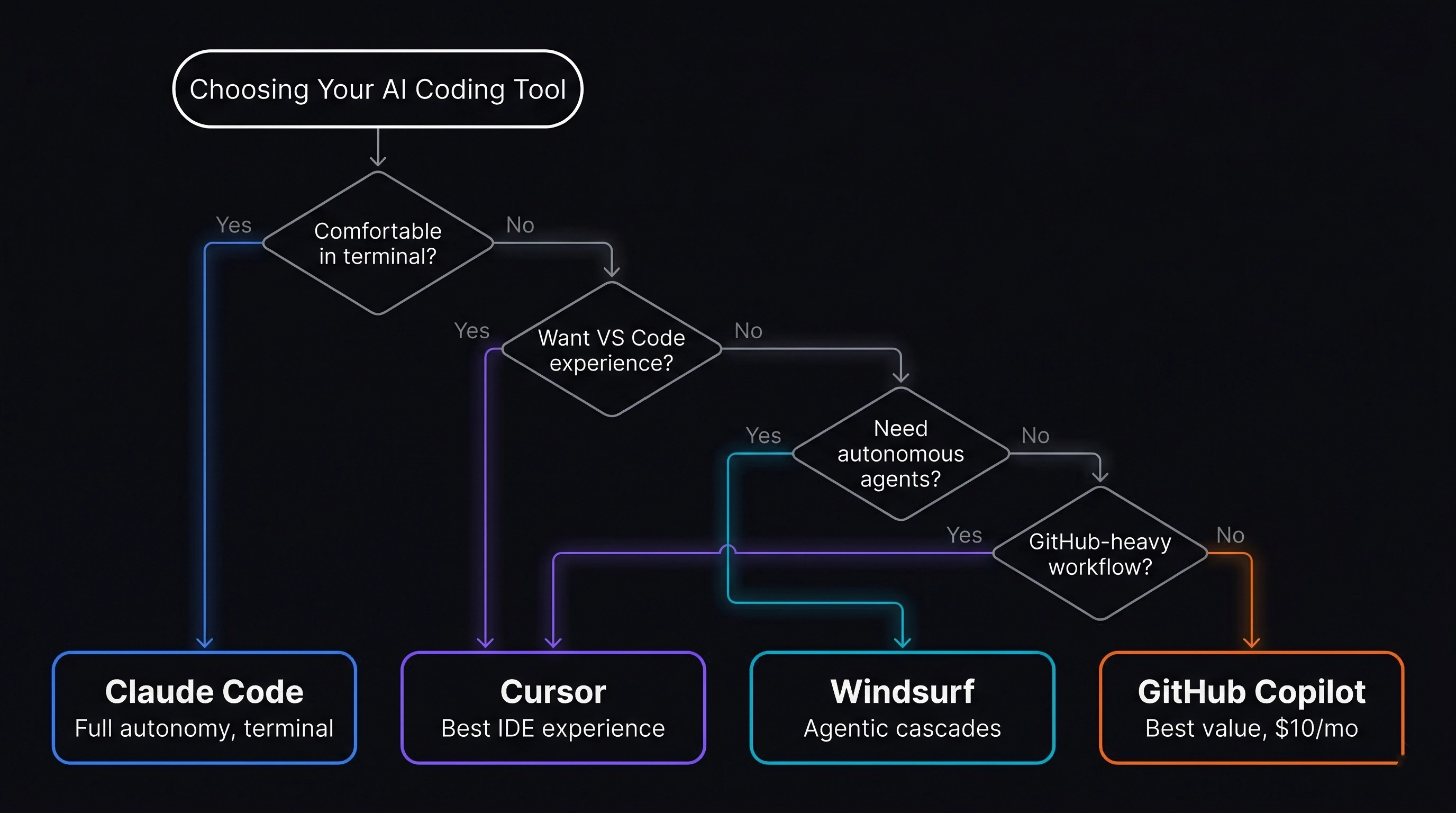
There's no single best tool — it depends on how you work:
- Maximum autonomy + deep reasoning → Claude Code
- Polished inline AI in a familiar editor → Cursor
- Agentic IDE on a budget → Windsurf
- Broad integration, minimal setup → GitHub Copilot
- Open-source, terminal-based → OpenAI Codex CLI
Many developers combine tools. They're not mutually exclusive.
Whatever you choose, invest time in structuring your prompts and project documentation. The best AI coding assistant is the one that gets clear instructions.
📌 Key Takeaways
- AI coding tools in 2026 are full agents — they plan, execute, test, and iterate across entire codebases.
- Claude Code leads for deep reasoning and multi-file refactors. Cursor leads for inline editing UX. Windsurf offers the best free tier. Copilot is the easiest on-ramp. Codex CLI is the open-source option.
- The biggest performance differentiator isn't the tool — it's the quality of your input. Structured PRDs and context files matter more than which AI you use.
- Combine tools for best results: use agents for complex work, inline editors for UI, and PRD generators for planning.
- Write project context files (
CLAUDE.md,.cursorrules) — they transform generic AI output into code that follows your patterns. - Before you pick a tool, make sure you have a solid plan. Validate your idea first, then generate a PRD, then start coding.