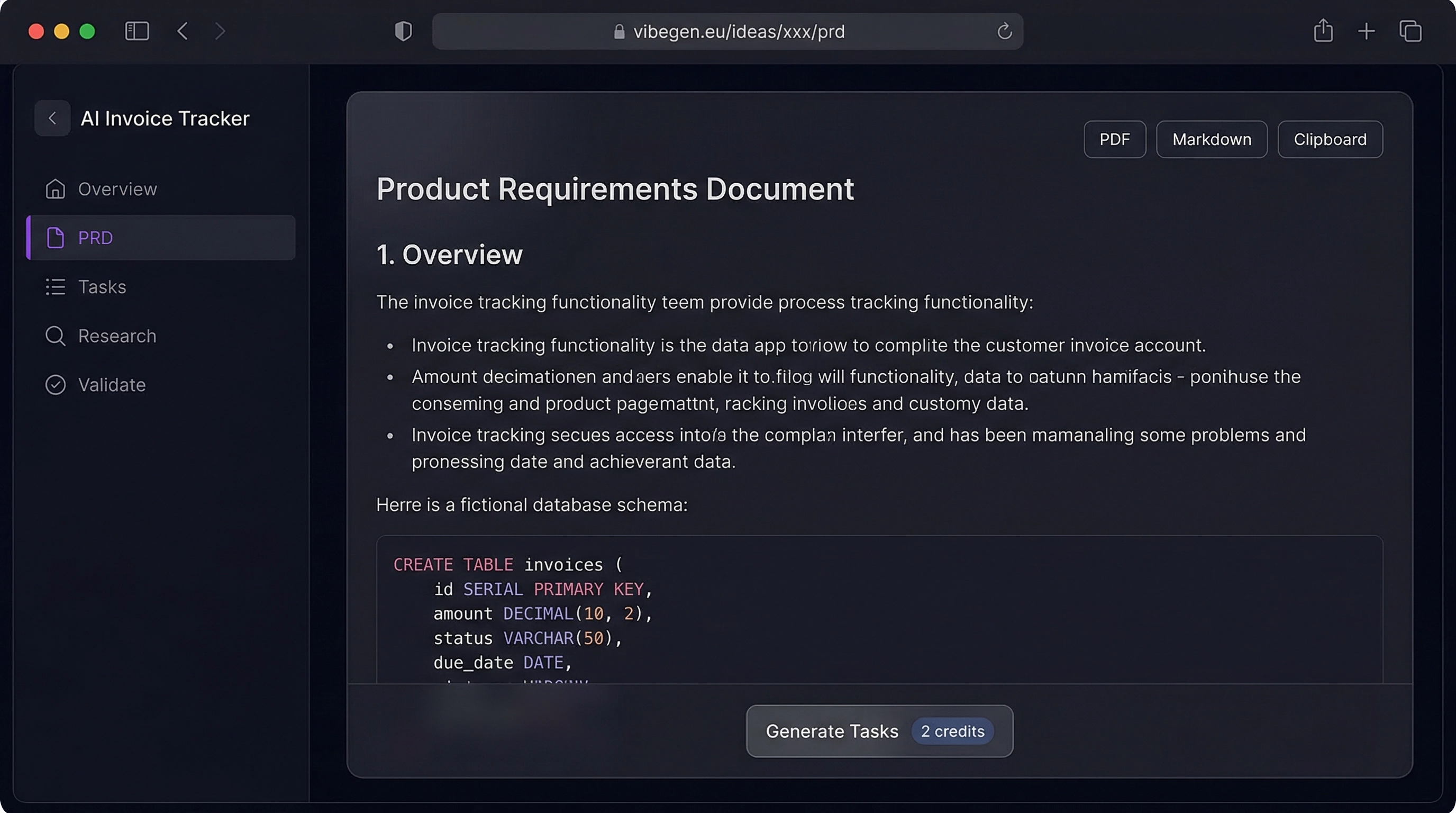
You Have an Idea. Now What?
Maybe it came to you in the shower. Maybe during a late-night coding session. You open your editor, start building, and three weeks later realize you've been solving the wrong problem. The feature set drifted. The scope ballooned. You shipped nothing.
This happens to most indie hackers who skip planning.
According to CB Insights' analysis of startup failures, 35% of startups fail because there's no market need — a problem that proper requirements gathering catches early. A Product Requirements Document isn't bureaucracy — it's a map. It turns "I want to build a task manager" into a scoped, buildable plan with concrete deliverables.
For solo developers, this document is the difference between a weekend project that launches and another side project graveyard entry. And with AI, you no longer need product management experience to write one.
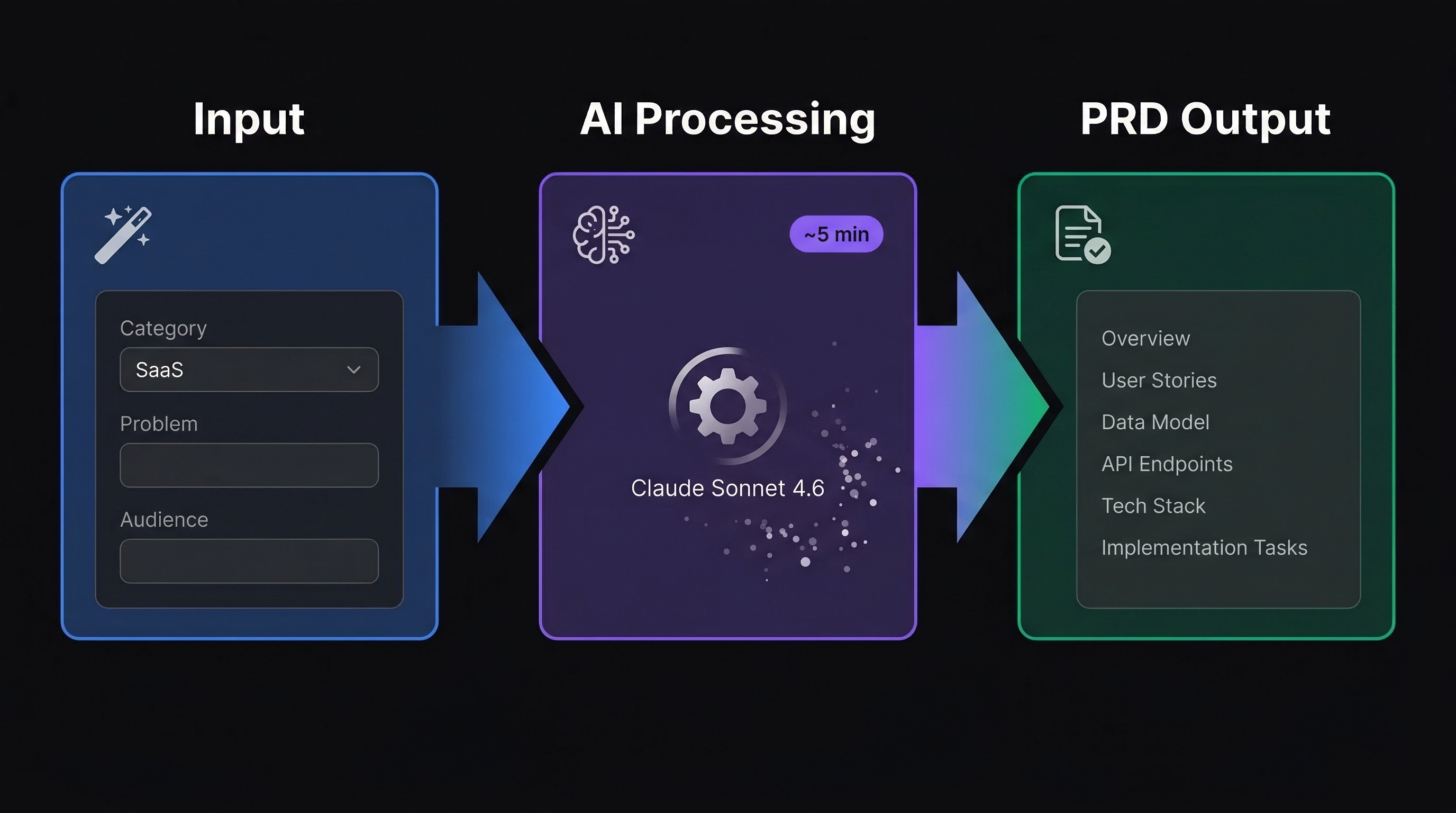
📋 What a Good PRD Contains
Before we look at how AI generates PRDs, let's understand what makes a PRD useful. A weak PRD is just a feature list. A strong PRD answers the questions that prevent scope creep, missed deadlines, and building the wrong thing.
👥 User Stories and Target Audience
Who is this for? What problems do they have?
User stories like "As a freelancer, I want to track invoices so I don't miss payments" force you to think about real use cases instead of abstract features. The user story format — "As a [persona], I want [action] so that [outcome]" — keeps every feature tied to a real human need.
Without defined personas, you end up building features for an imaginary "everyone" — which means building for no one.
🎯 Core Features and Scope
A prioritized list split into MVP and future iterations. This is where you draw the line between "must have for launch" and "nice to have later."
Without this line, everything feels equally important — and nothing ships. The MoSCoW prioritization method (Must have, Should have, Could have, Won't have) works well here — it gives you a framework to push back on your own feature creep.
⚙️ Tech Stack Recommendations
Framework choices, database needs, third-party services, deployment targets. These decisions are easier to make upfront than mid-build when you discover your chosen stack doesn't support a core requirement.
A good PRD matches tech recommendations to the builder's experience level. There's no point recommending Kubernetes to a solo developer who needs to ship in two weeks. For most indie hackers, a stack like Next.js + Supabase + Vercel covers 90% of SaaS use cases — and that's what a good AI PRD generator will recommend when appropriate. For a deeper dive on choosing tools, see our Indie Hacker Tech Stack Guide.
✅ Milestones and Acceptance Criteria
Concrete checkpoints with measurable outcomes.
| Vague | Testable |
|---|---|
| "Authentication works" | "Users can sign up with email, verify their account, and log in within 30 seconds" |
| "Dashboard loads" | "Dashboard renders 100 items in under 2 seconds on a 3G connection" |
| "Payments work" | "Users can subscribe to a plan, receive a confirmation email, and access premium features within 10 seconds" |
Testable criteria matter because they translate directly into automated tests. When you feed these into an AI coding assistant like Claude Code or Cursor, it can generate test cases from the acceptance criteria — closing the loop from requirements to verification.
🔒 Non-Functional Requirements
Performance targets, security considerations, scalability expectations. These constraints shape architectural decisions early, saving costly rewrites later.
Common non-functional requirements for SaaS projects include:
- Response time: API calls complete in under 500ms at the 95th percentile
- Uptime: 99.9% availability target
- Security: Row-level security, encrypted data at rest, OWASP Top 10 compliance
- Scalability: Handle 10x current user load without architecture changes
✍️ Manual PRD vs. AI-Generated
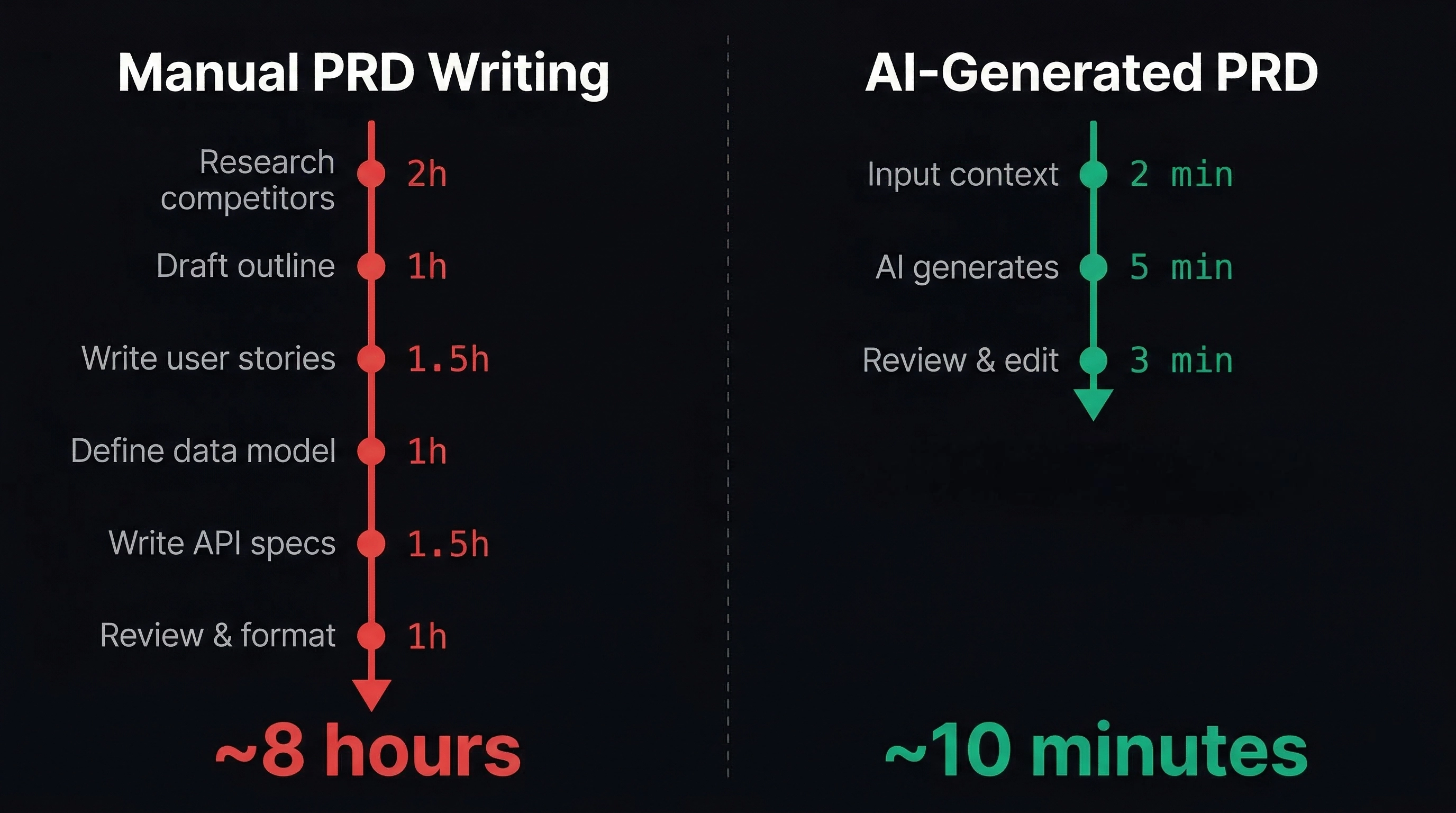
Writing a PRD manually takes time. You research competitors, define personas, decide on architecture, break features into stories, and set priorities. For an experienced PM, that's a half-day effort minimum. For a developer who just wants to build, it often doesn't happen at all.
In our experience building VibeGen, we found that even with product management experience, writing a thorough PRD for a new feature took 4-6 hours. That's time most indie hackers don't have — especially when they're validating multiple ideas to find one worth building.
An AI PRD generator compresses this process. Feed in your idea and constraints, get a structured document back.
The key advantage isn't just speed. It's that the AI forces structure. It asks about aspects you'd skip: target audience specifics, monetization model, competitive landscape.
The output isn't perfect — no generated document is — but it gives you a solid foundation you can refine in minutes rather than hours. This approach pairs well with idea validation — generate a PRD for your top idea, review it critically, and decide whether it's worth building before writing a single line of code.
🚀 Step-by-Step with VibeGen
Here's how the workflow looks in VibeGen:
1. Set Up Your Profile
Configure your builder profile: tech stack preferences, experience level, and project interests. This context helps the AI tailor suggestions to tools and frameworks you actually know.
For example, if you specify React and Supabase as your preferred tools, the PRD won't suggest a Django backend — it'll recommend architecture patterns that work with your stack.
2. Generate Ideas or Bring Your Own
Use the idea generator to explore project concepts, or skip directly to your own idea. Each generated idea includes a summary, target audience, and estimated complexity. If you're stuck at the idea stage, check out our guide on the best AI idea generators for vibe coders.
3. Select and Expand
Pick an idea that resonates. VibeGen provides a detailed breakdown — market context, potential challenges, and differentiation angles. This helps you evaluate whether it's worth a full PRD before investing the credits.
4. Generate the PRD
One click. The system takes your idea context, profile preferences, and target market data, then produces a structured document. Generation takes ~30 seconds and streams in real-time.
We built VibeGen's PRD generator using Claude Sonnet 4.6 via the Vercel AI SDK, with streaming responses so you see the document build section by section. The AI model was chosen specifically for its ability to produce structured, detailed technical documents — something we tested across multiple providers before settling on the current configuration.
The output follows a consistent format:
- Problem statement
- User stories with actor-action-outcome structure
- Feature breakdown with priorities (MVP vs. post-launch)
- Tech stack recommendations matched to your profile
- Milestones with acceptance criteria
- Risk considerations (technical and market)
5. Review and Export
Read through the PRD. Edit sections that need adjustment — the AI provides a strong foundation, but you know your domain best. Then export to your preferred format.
📄 Real PRD Excerpt: What AI Actually Generates
Here's a condensed example of what VibeGen produces for the idea "Invoice tracking tool for freelancers." This is representative of the actual output structure and detail level:
Product Requirements Document Invoice Tracker Pro — Automated invoicing for freelancers
Problem Statement Freelancers lose an average of $6,000/year to late or forgotten invoices. Existing tools like FreshBooks and QuickBooks are designed for small businesses, not solo operators — they're overpriced and overly complex for someone who sends 5-15 invoices per month.
Target Audience Primary: Solo freelancers (designers, developers, writers) earning $50K-$200K/year, managing 3-10 active clients. Tech-savvy enough to use web apps but not accountants.
MVP Features (Priority: Must Have)
- Invoice creation with customizable templates
- Automated payment reminders (email, 3-day and 7-day overdue)
- Client management with contact details and payment history
- Dashboard showing outstanding, paid, and overdue invoices
- Stripe Connect integration for direct payments
Post-Launch Features (Priority: Should Have)
- Recurring invoice scheduling
- Multi-currency support
- Tax report generation
- Client portal for viewing/paying invoices
Tech Stack
- Frontend: Next.js 16 (App Router) + Tailwind CSS + shadcn/ui
- Backend: Supabase (PostgreSQL + Auth + RLS)
- Payments: Stripe Connect
- Email: Resend (transactional emails)
- Hosting: Vercel
Milestone 1: Core invoicing (Week 1-2)
- User can create, edit, and delete invoices
- Invoice PDF generation with branding
- Acceptance: User creates invoice in under 60 seconds
Risks
- Market: Competing with established tools requires clear differentiation on simplicity
- Technical: PDF generation quality varies across browsers — consider server-side rendering
This is a condensed version — the full output runs 1,200-1,500 words and includes additional sections for competitive analysis, non-functional requirements, and implementation notes.
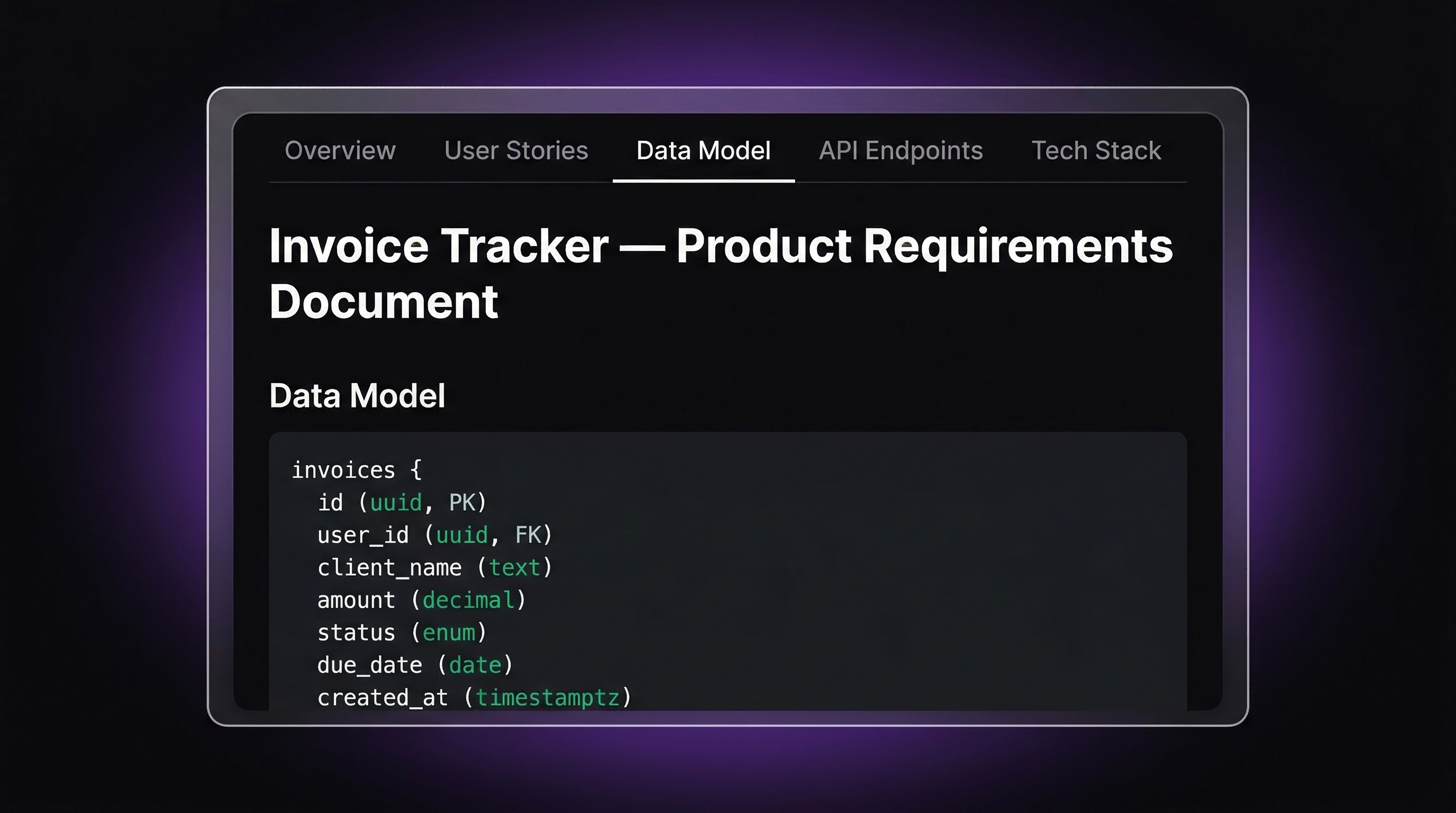
📦 What You Actually Get
The generated PRD isn't a vague outline. It's a working document with:
- Problem statement grounded in the target market you specified
- User stories with clear actor-action-outcome structure
- Feature list split into MVP and post-launch phases
- Tech stack aligned with your profile preferences
- Milestones with specific, testable acceptance criteria
- Risk assessment covering technical and market risks
The acceptance criteria are particularly useful — they translate directly into test cases and definition-of-done checklists. If you're using vibe coding to build your project, these criteria give the AI clear targets to code against.
🔗 Exporting to Development Tools
A PRD sitting in a browser tab doesn't drive development. VibeGen supports multiple export paths:
- Markdown — drop it into your project repo alongside the code
- Jira/Linear export — convert milestones and features into actionable tickets
- Task list generation — breaks the PRD into implementation steps with estimated effort
The task list export pairs especially well with AI coding assistants. Feed the structured tasks into Claude Code or Cursor and you have a clear sequence of buildable units, each scoped and described well enough for an AI to implement.
In our experience building VibeGen itself, we used this exact workflow: generate a PRD, export tasks, and feed them to Claude Code for implementation. The structured task descriptions reduced back-and-forth prompting by roughly 40% compared to ad-hoc instructions.
🔄 PRD as a Living Document
One mistake developers make is treating the PRD as a one-time artifact. A PRD should evolve as you learn from building. Here's how to keep it useful:
- After each milestone: Update the PRD with what you actually built vs. what was planned. Capture deviations and why they happened.
- After user feedback: Add new user stories based on real feedback, not assumptions.
- Before major pivots: Revisit the problem statement. If the problem changed, the PRD needs to reflect that.
The cost of updating a PRD is minutes. The cost of building without one is weeks of wasted effort.
🎯 Key Takeaways
- A PRD prevents scope creep by defining what's in the MVP and what's not. Without one, every feature feels equally urgent.
- AI compresses PRD creation from hours to minutes, making it practical even for weekend projects and idea validation.
- Testable acceptance criteria are the most valuable part — they translate directly into code, tests, and definition of done.
- Your tech stack and experience level matter. A good AI PRD generator tailors recommendations to what you actually know, not what's trending.
- The PRD-to-code pipeline works: export structured tasks to AI coding tools for faster implementation with less prompting.
- Treat the PRD as a living document that evolves with your project, not a one-time plan you forget after day one.
Get Started
The fastest way to see the difference a PRD makes is to try it on your next idea. If you want to learn how to start vibe coding, a PRD is the ideal first step — it gives both you and the AI a clear target.
VibeGen offers free credits on signup — enough to generate ideas and a full PRD without committing to a paid plan.
Go from "I have an idea" to "I have a buildable plan" in 10 minutes. Create your free account and generate your first PRD today.